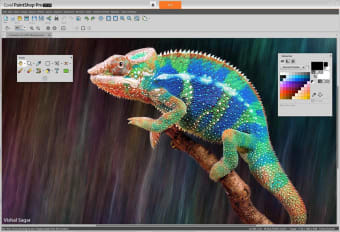
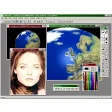
Corel Paint Shop Pro Photo contains everything you need to create fantastic photos. It provides advanced powerful photo effects and digital painting tools.
Paint Shop Pro X3 makes it easy to create professional-looking photos. You can import, edit and share your images—all in one place. The new organizer helps you sort, rate and tag your photographs faster than ever.
You can make quick fixes in the enhanced Express Lab or use more advanced photo-editing tools such as the new Smart Carver. Corel Paint Shop Pro Photo also allows you to publish directly to the web, create photo books and projects, or simply backup photos to disc.
Corel Paint Shop Pro Photo is divided into a set of tools: RAW Lab, which manually adjust groups of RAW photos during the loading process; Express Lab to quickly fix common photo flaws; Advanced tools, which allows you to edit with advanced features such as Smart Carver, Vibrancy etc. Meanwhile, Corel Paint Shop Pro Photo's Integrated Projects allow you to create photo books, HD slideshows, cards etc., and finally Photo sharing for email, print or send directly to Facebook, YouTube and Flickr.
Corel Paint Shop Pro Photo is a comprehensive and powerful photo editing suite.
New! PaintShop Pro X7 - Comprehensive photo-editing software (32-Bit)
Create your best photos ever with new Corel® PaintShop® Pro X7. With smarter editing features, 30% faster brushes, new creative tools and easier color selection, this complete photo-editing software helps you turn your snapshots into beautiful, gallery-worthy images. A great fit for all skill levels, PaintShop Pro X7 brings out the best in your photos that matter.
Whether you are a photo aficionado or a experienced photographer PaintShop Pro X7 was built with you in mind.
Some of the must have features include
NEW! Magic Fill
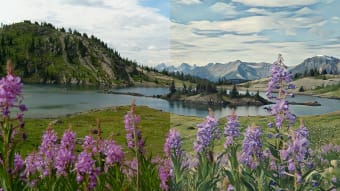
Seamlessly erase an unwanted part of your photo and replace it with background that matches the surrounding area—even if it is textured or varied—with Magic Fill. This content-aware feature works with your favorite selection tools.
NEW! Faster brushes
Enhance photos quickly with popular brushes, including Paint Brush, Airbrush and retouching brushes , that are 30% faster. Moving between workspaces is also faster in this release.
NEW! Text and Shape Cutting
Instantly create a photo object by using text or a shape to clip an underlying photo or image. The result is an instant photo object (new file) with a transparent background that you can paste or drag to any image as a layer.
User-friendly design
PaintShop Pro X7 introduces a more refined, cleaner user interface to make your photo-editing and designing tasks easier and more enjoyable. You’ll start smoothly and get things done faster in the new immersive and user-friendly workspace.
Video learning
The built-in Discovery Center makes it easier than ever to find the help you need. Choose from the library of helpful video tutorials to develop your skills and become a better photographer and photo editor.
This is the 32-Bit version. Please download the 64 Bit version if applicable for improved performance.
Laws concerning the use of this software vary from country to country. We do not encourage or condone the use of this program if it is in violation of these laws. Softonic may receive a referral fee if you click or buy any of the products featured here.

























.png)